
Getting started
Sort a chest in one click, put everything away, install Sorted and set your keys.
Sort in one click #
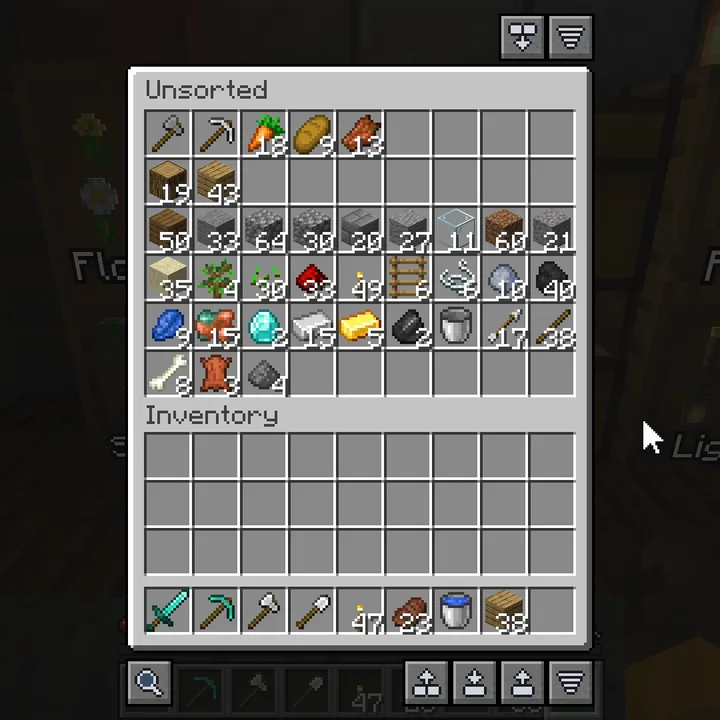
- Open a chest. Above it, on the right, is the sort button. Click it.
- Press E for your inventory. Below it is a row of buttons: search on the left, and quick fill, quick stack and sort on the right. See The buttons.
- Press R to sort your inventory. Your hotbar is left alone.
- Walk up to your chests, open your inventory and click Quick Stack. See Quick Stack.
What you need #
| Minecraft | Fabric | NeoForge |
|---|---|---|
| 26.1 to 26.3 | Fabric API | NeoForge 26.1.2 or newer, nothing else |
| 1.21.1, 1.21.3, 1.21.4, 1.21.5, 1.21.8, 1.21.10, 1.21.11 | Fabric API | Nothing else |
| 1.21.2, 1.21.6, 1.21.7, 1.21.9 | Fabric API | No: these never had a finished NeoForge |
- On Fabric, Fabric Loader 0.16 or newer.
- Mod Menu is optional, for a settings button in the Fabric mod list.
/sorted configopens the settings without it.
Install #
- Install Fabric Loader or NeoForge for your Minecraft version.
- Download Sorted from Modrinth, and what the table above lists for your version. Pick the Sorted file for your Minecraft version and loader.
- Put the files in the
modsfolder of your Minecraft folder. - Start the game and open a world.
With the Modrinth app or another launcher that reads Modrinth, installing Sorted picks the right file and pulls in what it needs for you.
Minecraft 1.21 itself isn't supported: play 1.21.1, which joins the same servers.
Every Minecraft version has the same Sorted: the same buttons, screens and settings. Pick the file for your version on Modrinth; there is one for each.
Sorted comes in English, Dutch, German, French and Russian, and follows the language you play in. The Russian translation was made by a member of the community.
The walkthrough #
Sorted has a short walkthrough of the buttons, Find Items, keeping items and the keys. Type /sorted onboarding, or press Start next to Walkthrough in the Help tab of the settings. On its last page you can click a key to change it.
Keys #
- R sorts your inventory while an inventory or chest screen is open.
- ` opens the search for items in your chests. See Search.
- The keep list has no key until you set one.
/sorted keepopens it too. See The keep list.
Set or change a key #
- Press Esc and open Options..., Controls... and Key Binds..., in that order.
- Scroll to the Inventory group. The Sorted keys are there: Sorted: Open Container Search, Sorted: Quick Sort Inventory and Sorted: Open Keep List.
- Click the button next to one, for example Sorted: Quick Sort Inventory, and press the key you want.
- A key shown in red is also used by something else. Pick another one, or change the other one.
Settings #
Type /sorted config in chat, or open Sorted from Mod Menu or the NeoForge mod list. Every option is on the Settings page.
Nothing on the server #
Sorted is client-side only. It works on vanilla servers, Realms and in modpacks, and needs nothing installed on the server.
On a server, Sorted moves items with the same clicks you would make by hand, at a limited speed. Some servers do not allow inventory mods. Check the rules. See Servers.
Commands #
| Command | What it does |
|---|---|
/sorted or /sorted help | Every command, each one clickable. |
/sorted config | The settings. |
/sorted keep | The keep list. See The keep list. |
/sorted storage [add] | Show, or add, the last container you opened from another mod. See Containers from other mods. |
/sorted menuguard [on|off|status] | Leave server menus alone on this server, or not. See Servers. |
/sorted onboarding | The walkthrough. |
/sorted report | Report a bug or ask for a feature. See Bug reports. |
Next, you may want to
Something missing or wrong on this page? Say so on Discord.