
Material list
What a build needs, what is placed, what you carry and what is in your chests. Count raw materials, tick off what you have, gather what is left and share the list.
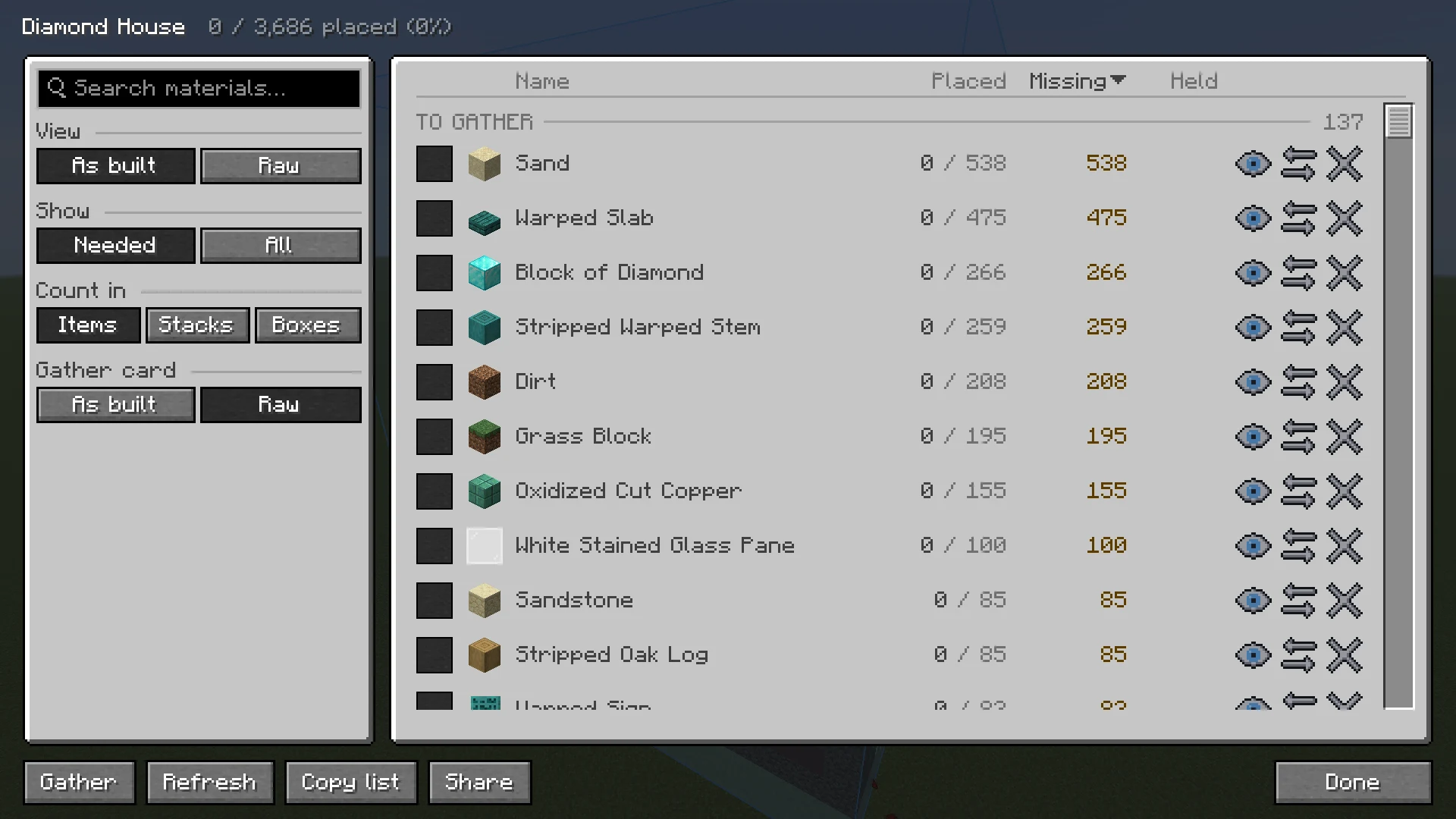
- For a build in your world: select it in the Loaded tab and click Materials, in the Build group.
- For a file you have not loaded: select it in the Local tab and click Materials. That list has the totals only.
On the left you choose what the list shows. On the right is the list. The buttons at the bottom work on the whole list.
Columns #
| Column | Meaning |
|---|---|
| Name | The block or item. |
| Placed | How many are in the world already, out of how many the build needs, for example 128 / 512. |
| Missing | What is left to get after what you carry and, with Sorted, what is in your chests. A check mark means you have enough. |
| Held | How many you carry, including what is in shulker boxes and bundles in your inventory. |
| Chests | Only with Sorted: how many are in chests Sorted knows. |
Click a column title to sort by it, and again to turn the order round. On a narrow window Held, Chests and Placed make room for the names, in that order. Point at a row to see every number, in stacks too. For a file that is not loaded, the only number is Total.
What the list shows #
| Choice | What it does |
|---|---|
| The search box | Filters by name. |
| View | As built lists the blocks as the build uses them: stairs, slabs and walls each on their own line. Raw lists what to gather. See below. |
| Show | Needed shows what is left, with what is done folded away. All shows everything. |
| Whole build or This layer | Under Show, while the Layer view is on. |
| Count in | Items, Stacks or Boxes (shulker boxes). Every number and the copied list follow it. |
| Gather card | Raw lists what to go out for on the Gather card. As built lists the blocks as the build uses them. Only for a build in your world. |
Raw materials #
With View set to Raw, stairs, slabs, walls and other shapes are counted back to the block they are made from, and planks to logs. Blocks that come from the same raw block are one line. BuildPrint uses the recipes of your game for this, datapacks included, so it matches the world you play in.
- Point at a raw line to see what it goes into, and whether that is made at a crafting table or a stonecutter.
- Some amounts are estimates: sticks count as planks, and signs and hanging signs are rounded. Those lines are marked, and the line under the list says the list is partly estimated.
- Swapping is done in the As built view.
Groups #
| Group | What is in it |
|---|---|
| To gather | Still to place. |
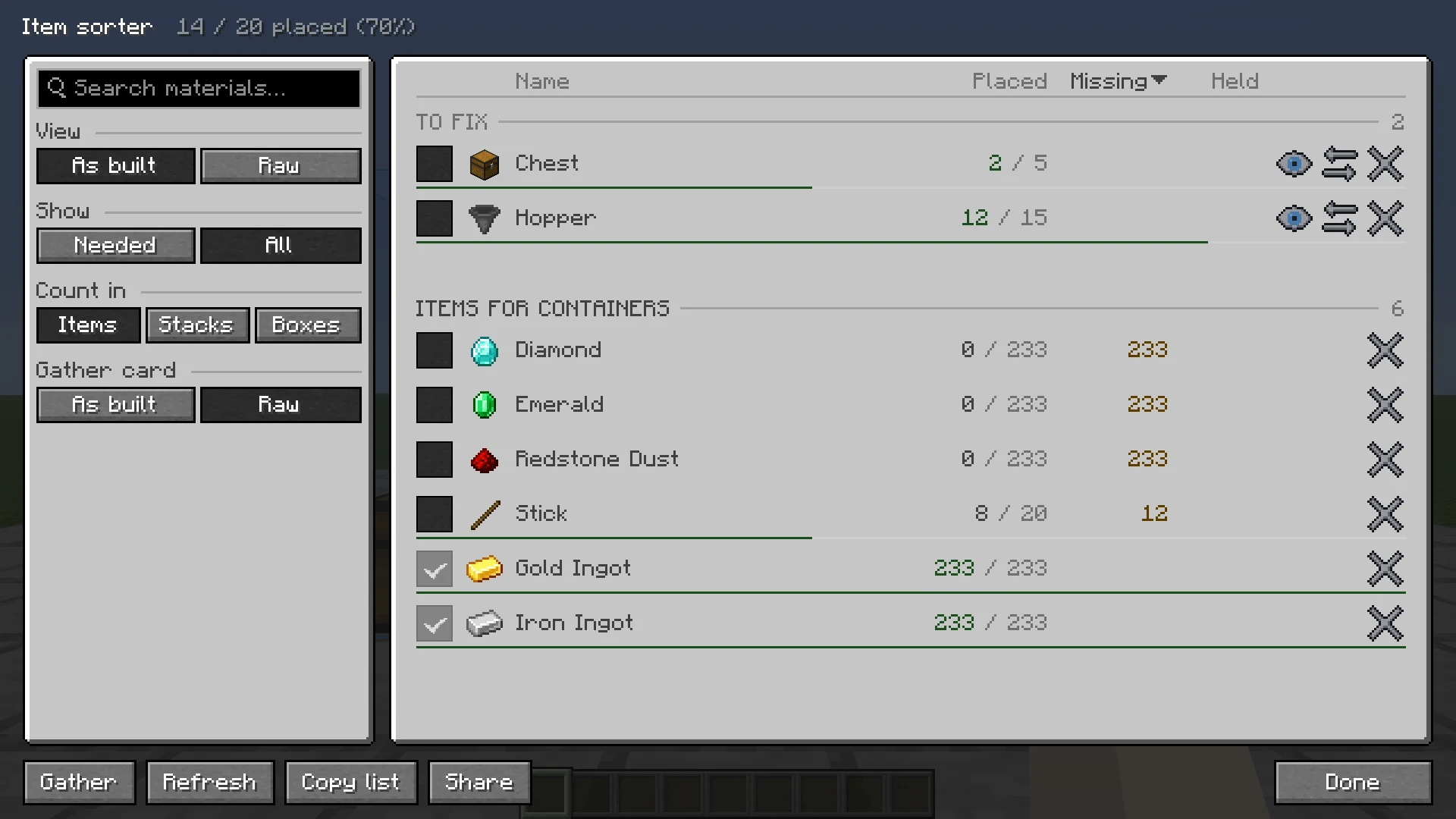
| To fix | Placed, but not right yet: turned the wrong way, or a container with the wrong items in it. |
| Done | Placed, or ticked off by you. With Show on Needed this is folded away. Click it to open it. |
| Extras | What a build needs besides blocks: dyes and glow ink for signs, seeds for crops and bone meal for tall plants. |
| Item frames, paintings and other entities | The item frames, paintings, armor stands and other entities of the build. |
| Items for containers | What goes inside the chests, hoppers and other containers. Items in a container that matched count as done. See Container contents. |
| Removed | What you took off the list. Folded away. Restore all puts it all back. |
| Removed by swap | Blocks you swapped for nothing with Don't build it. See Swap materials. |
Tick off and take off #
- The box at the start of a row ticks it off: you have it, or it is waiting somewhere BuildPrint cannot see. It moves to Done. Click it again to untick. A row that is done by itself shows a gray tick.
- The remove button at the end of a row takes it off the list, into Removed. The undo button there puts it back.
- Ticks and removals are kept per build, also after a restart.
- Reset ticks at the bottom puts every ticked and removed row back. Click it twice to confirm.
Show only some materials #
Put up the logs of a tree first, then the leaves. Each row of a build in your world has an eye.
- Click the eye to hide that material in the world. Click it again to show it.
- Shift-click the eye to show only that material. Again shows everything.
- In the Raw view the eye covers every shape made from that block.
- K (Show only the block in hand) does the same from the world, for the build you stand in. Press it again for everything.
- Once every block on show is placed, the rest comes back by itself, and it says so above the hotbar. Place the last log and the leaves appear.
- Show every material, at the bottom, puts everything back. One material always stays on show.
The ghost, the marks and outlines, easy place, the printer, paste, the Gather card and the status panel all follow what is on show. It works together with the Layer view, is kept with the build, and the title of the list says how many materials are on show.
Gather #
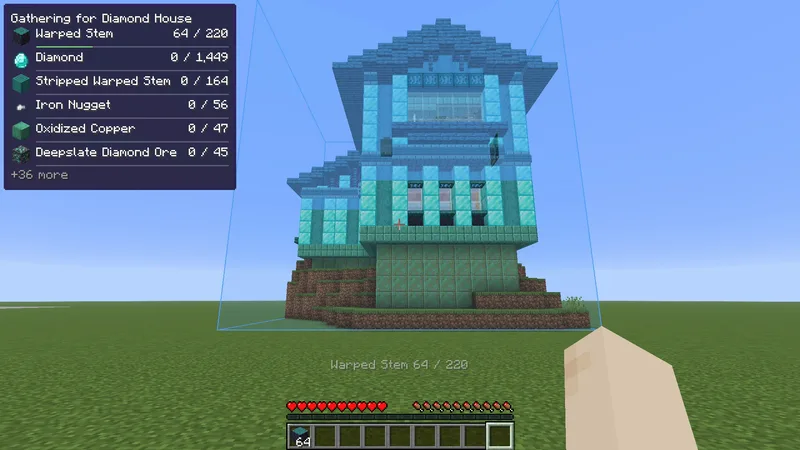
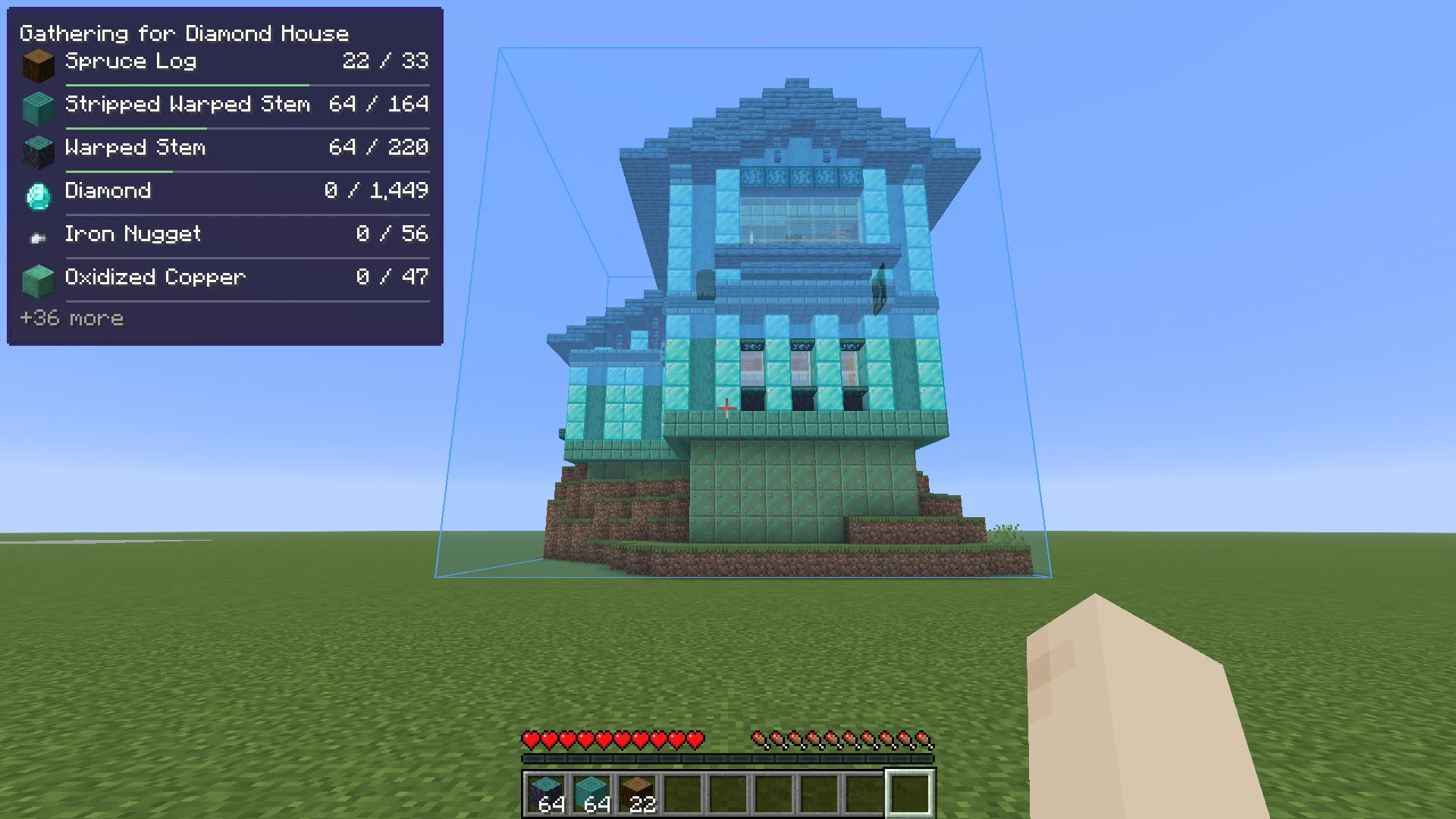
Gather, at the bottom of the list of a build in your world, closes the list and puts what is still to get on screen in a card, Gathering for and the name of the build. It stays wherever you go, so you can go out and get it all without opening the list again. Stop gathering, in the same place, takes it off.
- It lists what you go out for, as the Raw view does: logs, not planks, and the block that stairs and slabs are made from. To see the blocks as the build uses them, set Gather card to As built in the list, or turn on Gather card as built in the HUD tab of the settings.
- What you carry counts first, shulker boxes and bundles included. So do planks, stairs and other blocks you already made.
- With Sorted, what is in your chests shows after the name, for example 12 in chests, and stays on the card, at the bottom and marked, until you carry it. When you start, the chests that hold the most of one of the materials light up, so you know where to begin.
- Rows you ticked off or took off the list are left out, and so are blocks with no item, such as potted plants.
- It follows the Layer view and the materials on show, and the title says which, for example layer 12.
- Six rows at most, then for example +4 more. On compact, the first three with how many are left.
While you gather #
- Picking up something on the list says above the hotbar how far along it is, for example Sand 212 / 400, or Sand: enough. That row goes to the top of the card and stays there until you have enough.
- A row goes once you carry enough of it. Once you carry everything for the build, the card goes with Everything for and the name of the build is gathered.
- With Sorted, once what you carry and what is in your chests cover the list, it says so and adds grab the rest from your chests. The card stays with what is left to grab.
- With the layer view on, the line above the hotbar says when the layers on show are gathered, for example Everything for layer 12 is gathered, and the card stays. Step up a layer and its list shows.
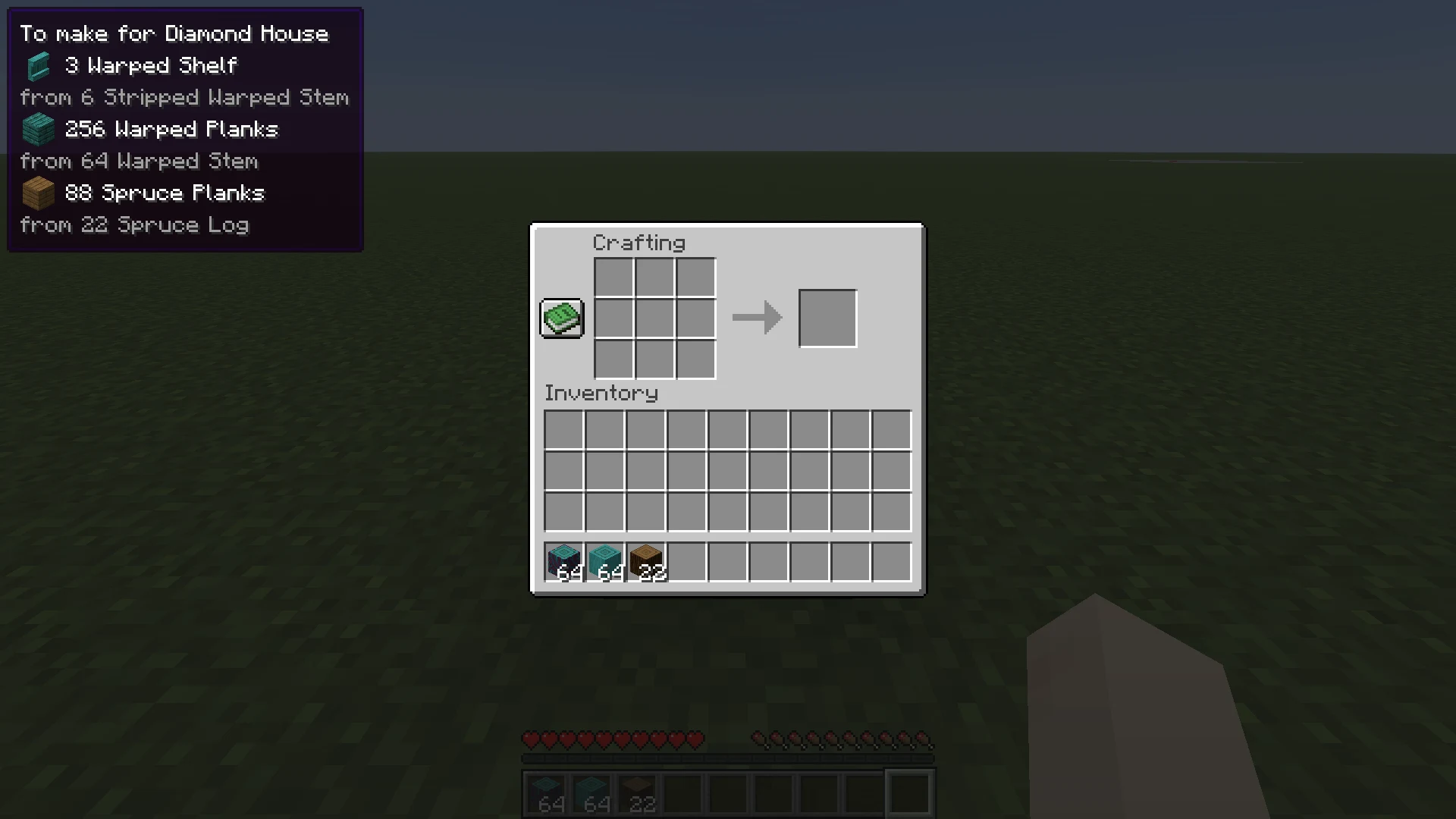
- At a crafting table or a stonecutter, a card says what to make from what you carry, for example 24 Oak Planks, from 6 Oak Log. Only what that station makes, only what you have the ingredient for, and only as much as the build still needs.
- You gather for one build at a time. Gather on another build moves the card there. It stays on that build, also after a restart, in other dimensions, and for a build you have not been near yet. Removing the build ends it.
- Clicking Gather brings the card back if you turned it off, and says so when nothing is left to get: Nothing to gather: you have everything.
In a Build together session, picking up a material leaves it to you: it goes off the others' cards, and their cards say who is getting what. See Gather together.
The card is Gathering on the HUD tab of the settings, to move, resize or hide like the other cards. See Status panel.
Copy and share #
- Copy list copies what is still missing to the clipboard, in the unit you chose, to paste in a chat or a note.
- Share opens Share material list, with two ways to share.
| Choice | What happens |
|---|---|
| List only | Puts the list on this site as a page anyone with the link can read. You get a share code, Copy link and Open. Sharing the same build again updates the same page. The page is kept for 90 days after you last share it. No account needed. |
| With the build | Starts a Build together session, whose page shows the build in 3D with a live material list. Needs a build loaded from a file. A build that is already in a session offers Open its session instead. |
Once it is shared, the link also goes into chat, with Copy link and Open, so it is still there after you close the list.
How it stays up to date #
The list updates as you place and break blocks and as chunks load. Parts of a build that your game has not loaded yet are shown as not yet checked. Visit the build, or click Refresh. In a session, when you are far from the build, the list can show what someone else in the session saw.
With Sorted #
With Sorted installed, the Chests column shows how many of each block are in chests you have opened, and Missing counts them as yours. Click the magnifier on a row to light those chests up through walls. On a server these counts are what Sorted last saw, so they can be out of date.
Next, you may want to
Something missing or wrong on this page? Say so on Discord.