
The ghost
How the build is drawn in your world and what you can change about it.
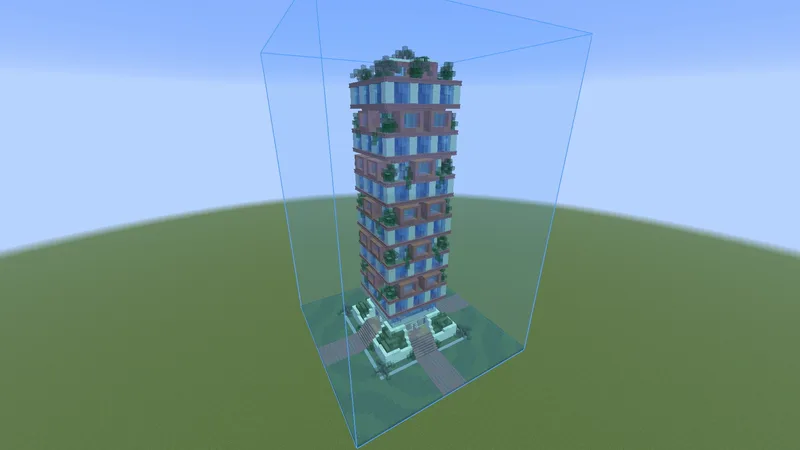
What is drawn #
- Blocks with their real models and states, including blocks from other mods.
- Leaves, glass, water and lava look the way they do in the world.
- Chests, signs with their text, shulker boxes and banners.
- Decoration made of entities: armor stands, item frames, paintings, displays, minecarts and boats.
Mobs such as villagers and animals in a schematic are not drawn.
Where you already placed the right block, the ghost is not drawn: you see your own block.
Settings #
In the Rendering tab of the settings, under Ghost and Ghost appearance. The picture at the top of the tab shows the ghost as the settings draw it.
- Ghost opacity default 85%
- How see-through the ghost is.
- Tint the ghost default On
- Pulls the whole ghost toward one color, so it is easy to tell from real blocks.
- Tint color default Blue
- The color the ghost is tinted toward.
- Tint strength default 30%
- How strongly the ghost is tinted. Every block keeps its own light and dark.
- Vanilla face shading default On
- Shades faces by direction like the game does.
- Skip hidden faces default On
- Only draws faces on the outside. Faster.
- See through solid blocks default Off
- Draws solid ghost blocks like glass, so a wall behind a wall of the same build shows.
- Entity render distance default 64 blocks
- How far away chests, signs and entities of the ghost are drawn.
Hide it, or the box around it #
- The eye next to a build in the Loaded tab hides it, and shows it again. The eye next to the search box does that for every build. The keys for it are on Loading schematics.
- The blue box around a build is its bounding box: the edges of the space the schematic takes up, so you see where it goes. It has no setting of its own. It goes when you hide the build, or when you select it and click Remove. The file stays.
- Blue outlines on single blocks are Outline missing blocks. See Outline missing blocks.
Resource packs and shaders #
The ghost uses your resource pack, and shows under Iris shader packs. Players have tested it with Complementary, BSL, Bliss, Photon and I Like Vanilla, also on very large builds and together with Voxy and Better Clouds. The pack does not light or shadow the ghost: it is drawn on top of the finished picture. Heavy fog in a pack, as in BSL, makes it look more see-through in the distance.
Next, you may want to
Something missing or wrong on this page? Say so on Discord.